

aVenture Lookup tells you which company or person a name or other clue refers to. It handles one name per request. A CRM export has thousands of rows. A portfolio page names a hundred companies. An AI agent wants to hand off a slow lookup and keep working instead of holding a connection open.
Two additions to the API cover those cases: bulk lookup jobs, which identify a whole list in one background job, and asynchronous requests, which turn a slow lookup or search into a job you check back on.
Identify a whole list in one job
Send POST /v1/lookup-jobs with a maxNames bound between 1 and 2,000 and one of two inputs:
- A list of names you already have. Each row is a
nameand atype:COMPANY,PERSON, orPRODUCT_SERVICE. - A page. Send its URL, and the job reads the page, extracts the names it mentions, and identifies up to
maxNamesof them.
aventure lookup-jobs create --max-names 500 --source-url "https://example.com/portfolio"
The job runs in the background. Read it with GET /v1/lookup-jobs/{jobId}, which asks you to wait 10 seconds between reads while it works. Each name comes back with the same answer a single lookup gives: MATCHED with the record, NO_MATCH when aVenture does not hold it yet, or NEEDS_REVIEW with ranked candidates when namesakes are too close to call. Names settle one by one, so the rows fill in while the job is still running, and progress fields such as namesProcessed tell you how far along it is.
Bulk jobs follow these rules:
- No new records. A bulk job does not create placeholder records or start research. A
NO_MATCHstays aNO_MATCH, and you pay only for the lookup. - Duplicate rows. Two rows with the same type and name, ignoring case, are identified once.
- Repeated requests. Sending the same request again within 24 hours returns the earlier job instead of starting and charging a second one.
- Failed names. A name that fails returns a one-sentence reason, and the rest of the list still completes.
Bulk jobs draw on their own hourly allowance of 2,000 names, so a big job does not use up the per-minute quota your single lookups rely on. Like name lookup, they need AI Plus or AI Pro.
A pipeline for messy lists
Bulk lookup is the first step in matching an unreliable list to aVenture records:
- Identify the list. Send the CRM export, the bank counterparties, or the conference attendee page to a bulk job.
- Act on each answer. Join
MATCHEDrows to their aVenture records. SendNEEDS_REVIEWrows to a person. KeepNO_MATCHrows aside. - Update incomplete records. Each match includes when its record last changed (
updatedAt). A company match also includes how complete its record is (dataCompletionCoverage). Send only incomplete or outdated records for a research update.
The Identify a List of Names guide has the full request and response shapes, with curl, CLI, and MCP examples.
Stop holding connections open
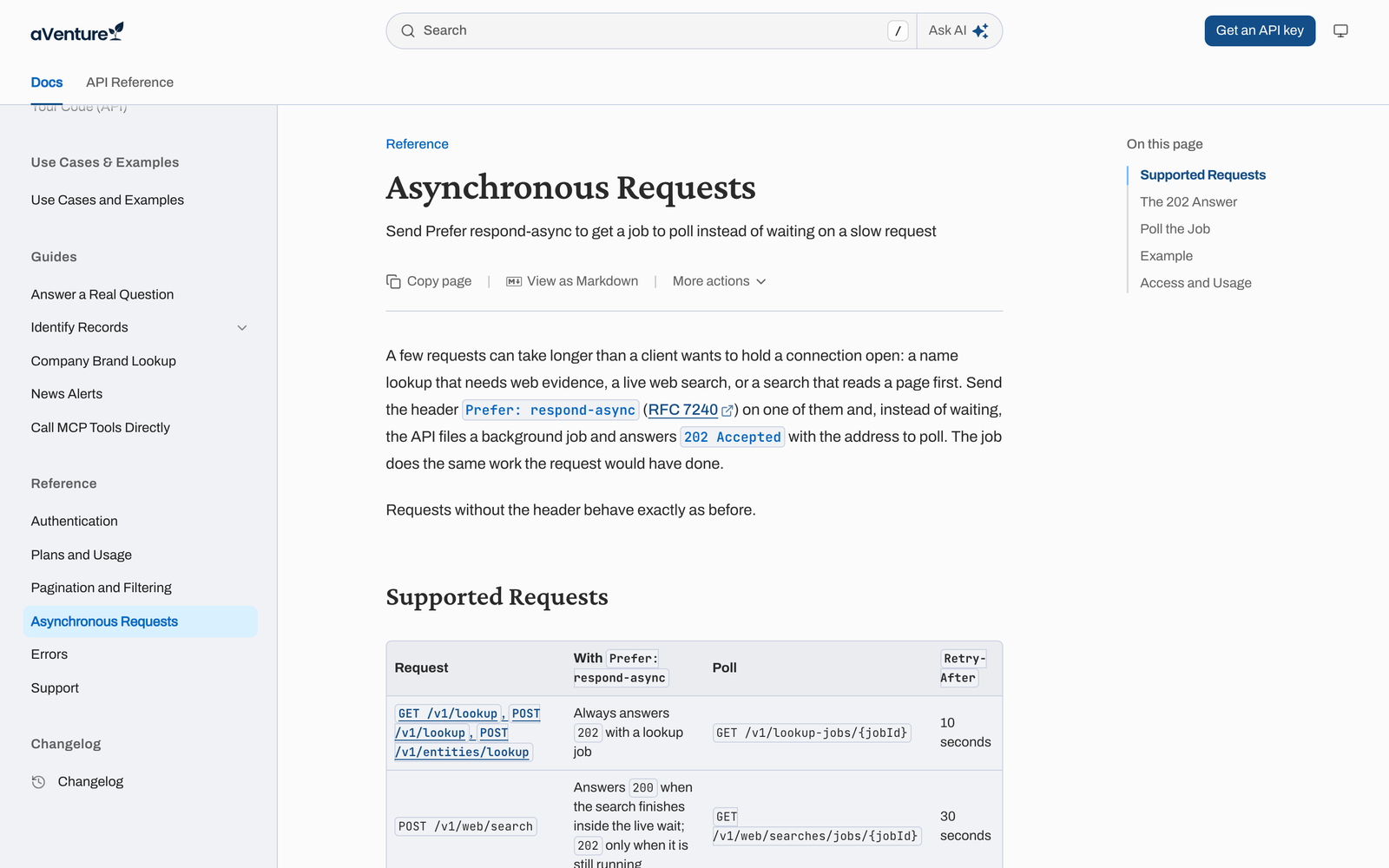
Some single requests take longer than a client wants to wait: a name lookup that needs a new web check, a live web search, or a search that reads a page first. Send the standard Prefer: respond-async header with one of them. The API starts a background job and answers 202 Accepted right away with the address to poll.
curl -i -X POST "https://api.aventure.vc/v1/lookup" \
  -H "Authorization: Bearer $AUTH_TOKEN" \
  -H "Content-Type: application/json" \
  -H "Prefer: respond-async" \
  -d '{"name":"Mercury","url":["https://mercury.com"],"kind":"ENTITY"}'
The Location header and the statusUrl in the body point at the job, and Retry-After says when to read it. Each read answers 202 while the job runs and 200 once it finishes. A web search or link search job returns the same body the original request would have. A lookup job returns the job, whose identification holds exactly the answer the original lookup would have given. Three kinds of request accept the header today:
| Request | Poll | Wait between reads |
|---|---|---|
Lookup by name (/v1/lookup, /v1/entities/lookup) |
GET /v1/lookup-jobs/{jobId} |
10 seconds |
Web search (POST /v1/web/search) |
GET /v1/web/searches/jobs/{jobId} |
30 seconds |
Link search (GET /v1/search/link) |
GET /v1/search/link/jobs/{jobId} |
5 seconds |
A web search that finishes within its normal wait still answers 200 at once, and a lookup whose name is exactly a record's id, handle, or slug never needs a job. Requests without the header behave exactly as before.
AI agents and serverless functions benefit most, because they often run under short request timeouts. An agent can start a slow lookup, do other work, and pick up the answer on its next turn. The CLI and the MCP server keep waiting for answers the way they always have, and both can read any job by its id.
Try it
Both features are live in the API. Start with the Identify a List of Names guide and the Asynchronous Requests reference, and see Plans explained for how lookups count against your plan.